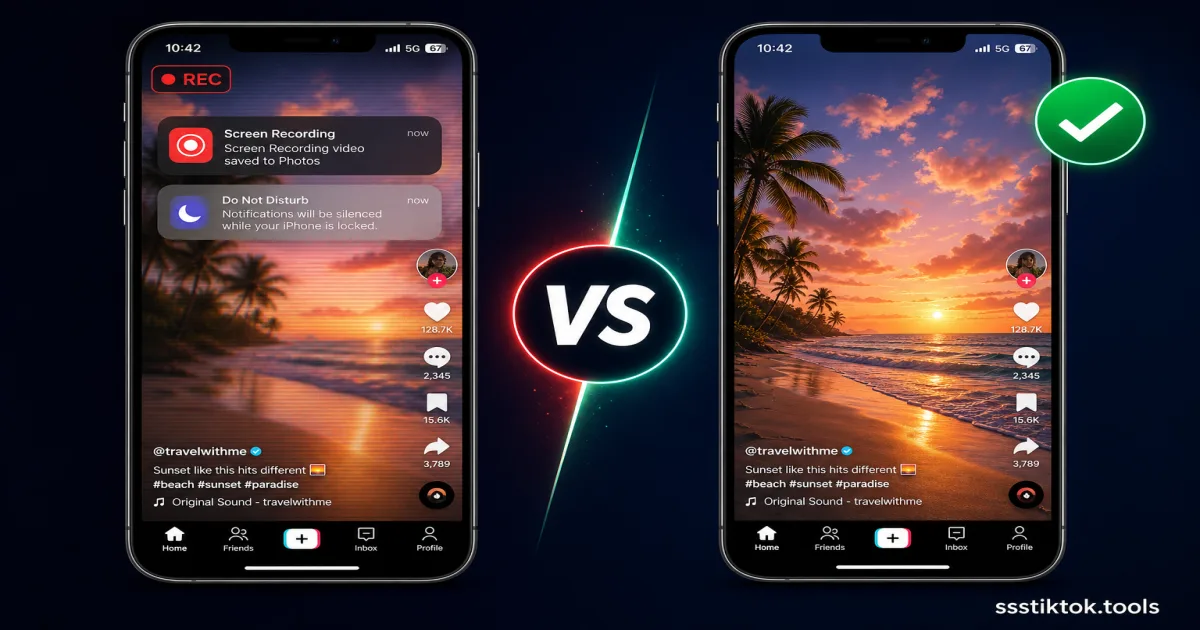
You are scrolling through your For You Page, you land on a video you want to save, and your thumb goes straight to the screen recording button in Control Center. It is the fastest instinct, but it is also the worst way to save a TikTok video, and once you see the side-by-side comparison, you will never do it again.
This breakdown covers exactly why screen recording tanks quality, what it costs you in storage, and how downloading directly with a tool like ssstiktok.tools gets you a better file in less time.
Why People Screen Record TikTok Videos
The Appeal of Screen Recording
Every iPhone since iOS 11 has screen recording built right into Control Center, and every recent Android phone has an equivalent in the quick settings tray. There is zero setup: swipe down, tap record, play the clip, stop. For creators who grew up making Vine and Snapchat videos this way, it is muscle memory. It also works on literally anything visible on screen, whether that is a Duet, a TikTok Live from a creator like Charli D'Amelio, or a Story that vanishes after 24 hours.
The Hidden Problems
The catch is that screen recording captures your entire display, not the video file itself, which drags a whole list of problems along with it:
- Frame rate cap: iPhones and Androids typically cap screen recording at 30fps no matter what the source video was shot at, so smooth 60fps clips end up choppier.
- Status bar and UI baked in: Your carrier name, battery percentage, the clock, and TikTok's own like/comment/share sidebar all get burned permanently into the file.
- Notification pop-ups: A text from your mom or a Slack alert mid-recording lands right in the middle of your saved clip with zero way to remove it after the fact.
- Double compression: TikTok already compresses the video before it hits your feed. Screen recording re-encodes that compressed footage through your phone's screen capture encoder, so you are compressing an already-compressed file.
- Battery and storage drain: Screen recording is one of the heaviest tasks your phone's GPU handles, and the resulting files typically run 3-5 times larger than the same clip downloaded properly.
- No clean audio: You cannot pull isolated audio out of a screen recording without extra editing software, and system sounds can bleed into it if your settings aren't locked down.
Screen Recording vs Downloader: Side-by-Side
Video Quality Comparison
A proper download pulls the exact file TikTok's servers store, the same resolution and bitrate the creator originally uploaded, usually 720p or 1080p. Screen recording instead re-captures whatever your display renders, capped by your phone's own recording settings, and squeezes it through a second compression pass. Play them back to back and the downloaded version is noticeably sharper, especially in fast cuts or dance transitions where compression artifacts show up first.
File Size and Storage
A 30-second screen recording of a TikTok video commonly lands between 40-80MB once you factor in the fixed bitrate over the full duration. The same clip downloaded directly usually comes in at 3-8MB. On a base-model iPhone with 128GB of storage, that difference matters fast if you are saving clips regularly.
Speed and Convenience
Screen recording forces you to sit through the entire video in real time, so a 3-minute video eats 3 full minutes, and then you still have to trim the UI and dead air afterward in a separate editing app. A downloader processes the file in a couple of seconds no matter how long the video is, and hands you a clean, ready-to-share file with nothing left to edit out.
How to Download TikTok the Right Way (ssstiktok.tools)
For any public video, downloading takes less effort than recording the screen ever did.
Step 1: Copy the Link
Open the video in the TikTok app, hit the Share arrow, and tap "Copy Link."
Step 2: Paste and Process
Head to ssstiktok.tools and drop the link into the box. It pulls the original file straight from TikTok's servers in a few seconds, no app download, no sign-up.
Step 3: Download the Clean HD File
Pick HD video with the watermark removed, or MP3 if you just want the audio track, then tap download. It saves directly to your Photos app or downloads folder, fully clean, no status bar, no text alerts, no re-compression.
When Screen Recording Still Makes Sense
Screen recording has exactly one strong use case: capturing a TikTok Live broadcast in real time, since livestreams don't exist as a static file you can grab afterward unless the host saves a replay themselves. It is also the right call if you are recording your own screen interaction for a tutorial, rather than trying to save the video content itself.
On the device side, iPhones record screen at a slightly higher default bitrate than most Android phones, but both platforms still cap frame rate well under what TikTok can output natively. A lot of Android phones also stamp a recording indicator dot onto the footage, which is one more thing you'll have to crop out in post.
Frequently Asked Questions
Does screen recording notify the creator?
No. TikTok has no equivalent to Instagram's screenshot notification system, so a creator has no way of knowing their video got screen recorded. That said, reposting someone's content without credit is still a bad look under the Digital Millennium Copyright Act (DMCA) if it happens at scale.
Is screen record quality actually worse?
Yes, every time. Your phone re-encodes an already-compressed video file through its own screen capture pipeline, which caps out around 30fps and applies its own bitrate ceiling. Downloading grabs the original file TikTok's CDN actually serves, no re-encoding involved.
Can I screen record private videos?
If you can already view the video as an approved follower, screen recording is technically possible, but it sidesteps the creator's choice to disable downloads, which puts you in a legal gray area. That's exactly why a tool like ssstiktok.tools is restricted to public videos only.
Skip the recording button entirely, grab any public TikTok video in original HD in under 30 seconds.
Download with ssstiktok.tools