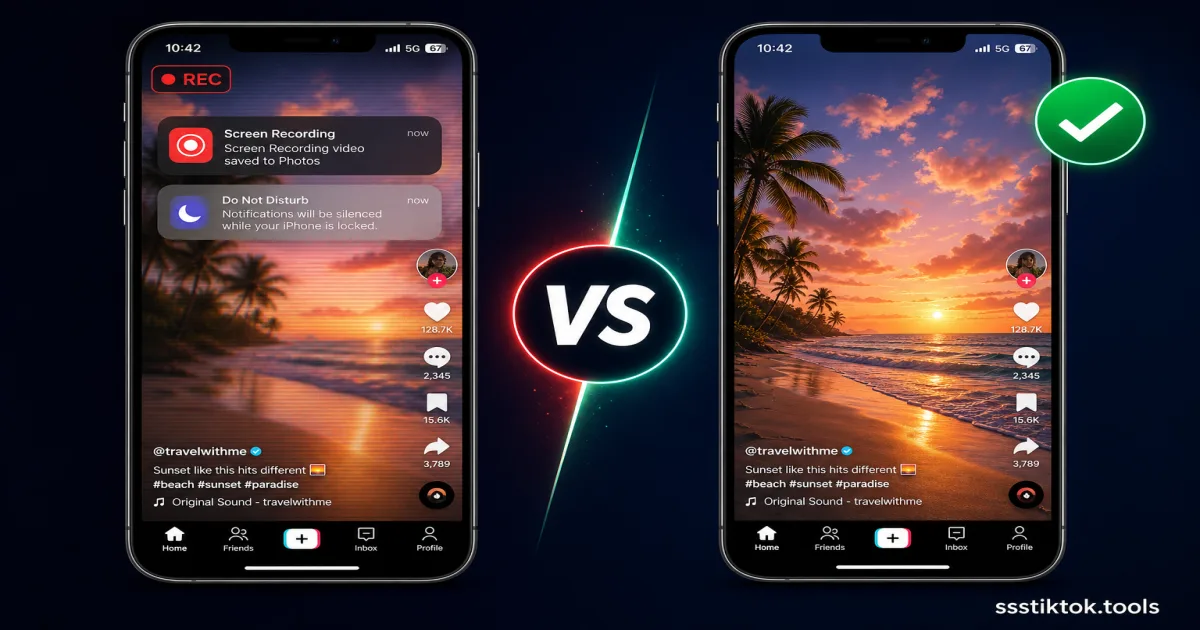
Screen recording is basically the default move for a lot of TikTok users in Indonesia and across Southeast Asia when they want to keep a video they love. It is right there in the quick settings panel, no ribet, no extra apps. But if you have ever watched your saved screen recording back and wondered why it looks so much worse than the original, this is exactly why, and there is a much better way to do it.
Why People Screen Record TikTok Videos
The Appeal of Screen Recording
Screen recording feels practical because it is already built into your phone. Whether you are on a budget Android or a newer iPhone, the recorder is sitting in the notification panel ready to go. A lot of creators, including local names like Awkarin or Raditya Dika style comedy accounts, get screen recorded constantly by fans who just want a quick save without leaving the app. It also works on anything visible on screen, including TikTok Live sessions and Stories that disappear after a day.
The Hidden Problems
The issue is that screen recording captures your whole screen, not the actual video file, so you inherit a bunch of unwanted baggage:
- Frame rate cap: Most phones lock screen recording at 30fps regardless of the video's real frame rate, so smooth clips get noticeably choppier.
- Status bar and UI stuck in the video: Signal bars, battery icon, clock, plus TikTok's own like and comment icons get permanently baked into the file.
- Notifications ruining the clip: A WhatsApp message popping up mid-record shows up right in your saved video with no way to remove it.
- Double compression: TikTok already compresses videos before they load. Screen recording compresses that footage again through your phone's own recorder, so quality drops twice.
- Battery and storage drain: Screen recording is heavy on your phone's processor, and the file size ends up 3-5x bigger than a properly downloaded MP4 of the same clip.
- No clean audio: You cannot extract isolated audio from a screen recording easily, and background sounds can leak in if your mic settings aren't set right.
Screen Record vs Downloader: Side-by-Side Comparison
Video Quality Comparison
A proper download grabs the exact original file from TikTok's servers, same resolution and bitrate the creator uploaded, usually 720p or 1080p. Screen recording just re-captures whatever your display shows at your phone's recording settings, and that gets compressed a second time. Watch them side by side and the quality gap is obvious immediately, especially in dance videos or anything with fast movement.
File Size and Storage
A 30-second screen recording can easily hit 40-80MB because it records the full screen at a fixed bitrate the whole time. The same video downloaded directly is usually just 3-8MB. If your phone storage is already tight, that difference adds up really fast.
Speed and Convenience
Screen recording means sitting through the whole video in real time, so a 3-minute clip takes 3 minutes to capture, then you still need to trim the UI parts out afterward. A downloader processes the file in a few seconds no matter the length, and gives you a clean file straight away.
How to Download TikTok the Right Way (ssstiktok.tools)
For any public video, this takes less effort than screen recording ever did.
Step 1: Copy the Link
Open the video in TikTok, tap Share, then tap "Copy Link."
Step 2: Paste and Process
Go to ssstiktok.tools and paste the link in. It pulls the original file directly from TikTok's servers in a few seconds, no app install needed.
Step 3: Download Clean HD File
Pick HD video without watermark, or MP3 if you just want the sound, then tap download. It saves straight to your gallery, no status bar, no notifications, no extra compression.
When Screen Recording Still Makes Sense
Screen recording is genuinely useful for one thing: catching a TikTok Live moment in real time, since a live broadcast doesn't exist as a downloadable file afterward unless the host saves the replay themselves. It is also fine if you need to record your own screen for a tutorial rather than saving the video content.
iPhone and Android handle this a bit differently too. iPhones usually record at a slightly higher default bitrate, while a lot of Android phones stamp a small recording icon onto the footage, which is one more thing to crop out later. Some Android skins also throttle screen recording resolution automatically when battery gets low, so quality can actually change mid-recording without you noticing until you play it back.
A Quick Note for Content Creators
If you post TikTok content yourself and want people to save it properly instead of screen recording low quality copies, enable the built-in "Allow Downloads" setting in your privacy options. This gives fans access to a clean HD download link instead of forcing them into screen recording, which protects your video quality and keeps your branding intact if you add watermarks or captions.
Frequently Asked Questions
Does screen recording notify the creator?
No. TikTok doesn't send any alert when someone screen records a video, unlike Instagram's screenshot notifications. Still, reposting content without giving credit is not a great look even if it goes unnoticed.
Is screen record quality actually worse?
Yes, every single time. You are re-encoding an already compressed video through your phone's own screen capture system, which caps at 30fps with its own bitrate limit. Downloading gets you the actual original file straight from TikTok's servers.
Can I screen record private videos?
If you can already view it as an approved follower, technically yes, but this ignores the creator's choice to disable downloads, so it's a legal gray area. That is exactly why tools like ssstiktok.tools only work for public videos.
Why does my screen recording sound weird?
If your phone's microphone was picking up ambient room noise alongside the app's internal audio, you will get a muddy mix on playback. Downloading skips that problem entirely since you get the creator's original clean audio track without any of your surroundings mixed in.
Skip the screen recording hassle, get any public TikTok video in original HD quality in seconds.
Download with ssstiktok.tools